If you’ve searched “Writrex vs Yoast” hoping to find out which one to pick, the answer is: both, because they do completely different jobs. Yoast SEO (and plugins like Rank Math and All in One SEO) analyse and configure the content you write. Writrex writes that content for you, then fills in your SEO plugin’s fields automatically.
Most people who find Writrex assume it’s another SEO plugin. It isn’t. It’s an AI content plugin that sits on top of your existing SEO setup and handles the part those plugins don’t touch: producing the actual pages.
You don’t need to switch anything. You keep Yoast, Rank Math, All in One SEO, SEOPress or The SEO Framework exactly as it is. Writrex adds a content production and site-health layer on top.
The short answer: they do different jobs
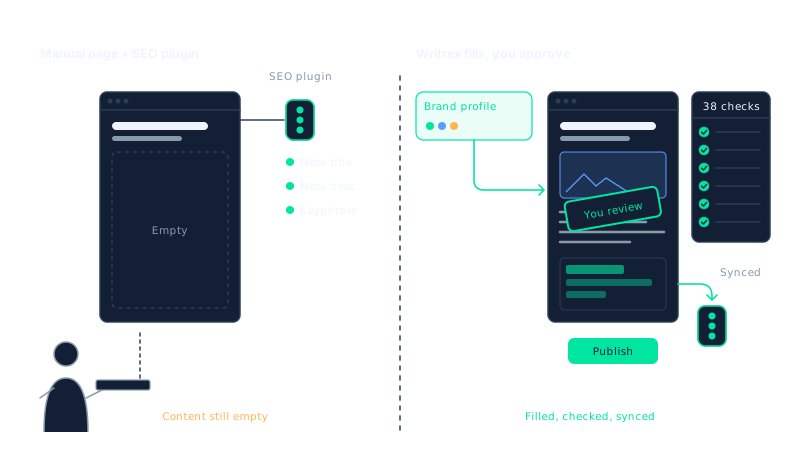
SEO plugins check the content you write. Writrex writes it and fills in your SEO plugin for you.
That one sentence covers most of the confusion. Yoast will tell you your focus keyphrase density is too low, your meta description is missing, or your readability score needs work. It won’t write the page. Writrex does write the page, using your own facts and your own AI provider key, and then it hands the SEO title, meta description and focus keyphrase straight to Yoast (or whichever plugin you use) so you don’t have to type them yourself.
Neither tool replaces the other. They operate at different layers of your WordPress setup.
What your SEO plugin actually does
It helps to be clear about what Yoast, Rank Math and All in One SEO are built for, because they’re genuinely excellent at it.
An SEO plugin handles the technical and analytical side of on-page SEO. Specifically, it:
- Analyses the content you’ve already written and scores it against a target keyphrase
- Lets you set a custom SEO title and meta description for each page or post
- Generates your XML sitemap and submits it to search engines
- Controls canonical URLs, noindex settings and Open Graph tags
- Adds breadcrumb markup and basic schema where applicable
What it cannot do is write the content in the first place. If you open a blank page in WordPress and activate Yoast, you still have to write every word yourself. The plugin analyses what you produce; it doesn’t produce anything on its own.
That’s the gap. For a site with five pages, it’s not a problem. For a local services business targeting thirty towns, or a WooCommerce store with hundreds of products, filling that gap by hand becomes a serious bottleneck. Understanding how to build local landing pages without doorway-page risk is where the conversation about tooling starts to matter.
What Writrex does instead
Writrex starts where your SEO plugin stops: at the blank page. It generates local landing pages, blog posts and WooCommerce product content using facts you supply through brand profiles – your real pricing, services, locations and tone of voice. The AI doesn’t invent details; it works from what you give it.
Every page it produces goes through a 38-check quality gate before it reaches your WordPress editor. A page needs a score of 80 or higher to be queued for review. Anything that falls short is saved as a draft with the reason recorded, so you know exactly what needs attention before you publish.
Once a page passes, Writrex detects which SEO plugin you have active and writes the SEO title, meta description and focus keyphrase directly into it. It also outputs a structured JSON-LD graph covering the business, the page type, services and FAQs, and it skips any schema nodes your SEO plugin already handles to avoid duplicates. You end up with a complete, ready-to-review page and populated SEO fields, without typing either yourself.
Writrex also monitors your existing content. Its SEO Reports tool scans the whole site for missing or badly sized titles and meta descriptions, doubled H1s, skipped heading levels, thin content, images without ALT text, broken internal links and phone numbers that aren’t clickable. When it finds a problem, Ask Writrex – an AI agent inside WordPress – suggests a fix as a change card. Nothing is applied until you press Apply, and every change can be undone. For larger jobs, SEO Repair can rewrite weak meta titles and descriptions across many existing pages at once, with backup and undo built in.
In a Writrex vs Yoast comparison, the clearest way to put it is this: Yoast reads your work and grades it; Writrex does the work and hands Yoast the metadata.
How they work together: a side-by-side comparison
The two tools occupy different parts of your workflow. Here is how the responsibilities split in practice.
| Your SEO plugin does | Writrex does |
|---|---|
| Analyses content you have already written | Writes the content from your own facts |
| Lets you set SEO title and meta description manually | Populates those fields automatically on every generated page |
| Generates your XML sitemap | Detects orphan pages and internal linking gaps across the site |
| Controls canonical URLs and noindex settings | Sets canonical and index settings where supported, using your SEO plugin’s own fields |
| Adds breadcrumb and basic schema markup | Outputs a full JSON-LD graph and skips nodes the SEO plugin already covers |
| Scores readability and keyphrase usage | Runs a 38-check quality gate before a page reaches your editor |
| Reports on individual pages as you edit them | Scans the whole site and suggests fixes through Ask Writrex |
Notice that nothing overlaps in a way that causes conflict. Writrex writes into your SEO plugin’s fields rather than around them. If you have structured data already being output by Yoast or Rank Math, Writrex checks for that before adding its own, so you don’t end up with duplicate schema in your page source.
The practical result is that your SEO plugin carries on doing exactly what it has always done – you still see the familiar traffic-light scores, the sitemap settings, the Open Graph controls. Writrex simply means those fields arrive pre-filled, the content behind them has already passed a quality check, and the rest of your site is being watched for the issues that tend to build up quietly over time.
Writing local pages, blog posts and WooCommerce content at scale
The volume problem is where the difference between an SEO plugin and Writrex becomes most concrete. Yoast or Rank Math can tell you that a page needs a better meta description. Neither one can write you fifty local landing pages for fifty service areas, each built from your own pricing, case studies and tone of voice.
That is exactly the gap Writrex fills. It draws on brand profiles you build once, which hold your real facts: the services you offer, the areas you cover, the prices you are comfortable publishing, and the voice you want the content to carry. Every page it generates pulls from those profiles rather than from generic AI training data, which is why the output can include specific details rather than vague filler.
The scale this makes possible is significant. A 30-page local campaign would take roughly 90 to 150 hours to produce by hand. Writrex produces a reviewable first draft of that volume in a fraction of the time, with your review as the final step before anything goes live. The same applies to blog posts and WooCommerce product descriptions. If you run a shop with dozens of products that still carry manufacturer copy, Writrex can work through them systematically, using your real product data rather than rewriting the same generic sentences in a slightly different order.
Nothing publishes automatically. Every page passes through a 38-point internal linking check as part of a broader quality process, and Writrex also flags orphan pages and internal linking gaps so the content you produce actually connects to the rest of your site rather than sitting in isolation.
Filling your SEO plugin’s fields automatically
One of the quieter advantages in any Writrex vs Yoast workflow is what happens to the SEO fields you would otherwise fill by hand. When Writrex generates a page, it detects which SEO plugin you have active and writes the SEO title, meta description and focus keyphrase directly into that plugin’s own fields. Canonical and index settings are handled where the plugin supports them. This happens on every plan, including the free tier.
The result is that by the time a draft reaches your editor, the fields Yoast or Rank Math would normally prompt you to complete are already populated. You can edit them, of course. But you are editing rather than starting from a blank box, which is a different kind of task.
Structured data follows the same logic. Writrex outputs a linked JSON-LD graph covering the business, the page type, services, FAQs and breadcrumbs where relevant. Before it adds any node, it checks whether your SEO plugin is already outputting that markup, and skips anything that would duplicate what is already there. Review and rating schema is never generated from AI output, so you are not adding claims the plugin cannot verify.
The practical effect is a page that arrives with its content written, its SEO fields completed and its schema in place, ready for your final check before it goes anywhere near a search engine.
Finding and fixing SEO issues across your whole site
Generating new content is only part of the picture. Most WordPress sites carry years of accumulated problems: meta titles that are too long or missing entirely, pages with no H1 or two competing ones, images with blank ALT text, broken internal links, and phone numbers that are plain text rather than tappable links. Your SEO plugin will flag some of these as you open individual pages, but it does not scan the whole site and report back.
Writrex includes two tools that work at site level. The first is SEO Reports, which scans every page and checks for missing or badly sized titles and meta descriptions, missing or doubled H1s verified against the live page rather than just the database, skipped heading levels, thin content, images without ALT text, broken internal links, pages hidden from search, and contact details that are not clickable. The second is SEO Repair, which can rewrite weak meta titles and descriptions across many existing pages at once, with backup and undo built in.
The agent that coordinates this is Ask Writrex, which reads both the WordPress editor version of a page and the live version visitors actually see. When it finds a problem, it presents a fix as a change card. Nothing is applied until you approve it, and every change can be reversed. It writes fixes directly into Yoast SEO, Rank Math, All in One SEO, SEOPress or The SEO Framework, whichever is active. If no SEO plugin is installed, it handles the output itself. It never touches PHP, theme files or plugins.
If you have ever spent an afternoon working through a meta titles and descriptions audit by hand, you will recognise the appeal of having that work done at scale with a clear approval step before anything changes. Ask Writrex and SEO Reports are included in the free Writrex Lite plan and every paid tier.
When Writrex is not the right choice
This is worth saying plainly, because no tool suits every situation.
Writrex is not the right fit if you write only a handful of pages each month and enjoy writing them. The setup time, which includes connecting your AI API key and building brand profiles, only pays off when you are producing content at a volume where doing it by hand becomes the bottleneck.
It is also not suited to anyone who wants fully automated publishing with no review step. Every page Writrex generates requires a human to approve it before it goes live. That is a deliberate design choice, and if you want a hands-off pipeline, this is not it. For more on where the line sits between useful AI content and what search engines penalise, the post on scaled content abuse and where Google draws the line is worth reading before you decide.
Writrex is a WordPress plugin, so if your site runs on a different platform, or if you need a hosted SaaS service rather than something installed inside WordPress, it will not work for you. And if your primary need is technical SEO configuration, sitemaps, redirect management or schema for a site you are not actively adding content to, your existing SEO plugin already covers that ground.
The clearest signal that Writrex is worth considering is a content backlog you cannot clear at your current pace, whether that is local service pages, product descriptions or blog posts, combined with a need for that content to be accurate, on-brand and ready for your SEO plugin’s fields to be populated before it reaches the editor.
Frequently asked questions
Do I need to uninstall Yoast, Rank Math or All in One SEO to use Writrex?
No. Writrex works alongside your existing SEO plugin, not instead of it. It detects whichever plugin is active and writes the SEO title, meta description and focus keyphrase directly into that plugin’s fields. Your SEO plugin keeps doing what it does: analysing, configuring and handling sitemaps.
Is Writrex vs Yoast really a fair comparison?
Not quite, because they solve different problems. Yoast (and Rank Math, and All in One SEO) help you optimise content you have already written. Writrex writes the content and then fills those plugins’ fields for you. Comparing them is a bit like comparing a spell-checker to a copywriter.
Will AI-generated pages hurt my rankings?
Google’s position is that it rewards useful, accurate content regardless of how it was produced, and penalises content that exists only to manipulate rankings. Every Writrex page is generated from your real business facts and passes a 38-check quality gate before it can publish. For more detail, see what Google actually says about AI-generated content.
Which AI providers does Writrex support?
Writrex uses your own API key from Gemini, OpenAI, Claude or Perplexity. You choose the provider and pay that provider directly for usage. Writrex does not mark up or resell AI credits. If you want to compare what each provider costs per page in practice, the post on what AI content really costs per page is a useful starting point.
Can Writrex fix SEO problems on pages it did not write?
Yes. SEO Reports scans your whole site for issues including missing or oversized meta titles, thin content, broken internal links and images without ALT text. Ask Writrex then suggests fixes as change cards you approve one by one. SEO Repair can rewrite weak meta titles and descriptions across many existing pages at once, with backup and undo.
Keep your SEO plugin. It is doing its job well. Writrex handles the job that comes before it: writing accurate, on-brand content at scale, populating your plugin’s fields automatically and keeping the rest of your site’s SEO in order.
Writrex writes from your real business facts and checks every page before it publishes. Start with Writrex Lite for free.