The AI content cost per page is rarely what the pricing page suggests. Most providers quote a price per million tokens, which sounds precise but tells you almost nothing about what you will actually spend to produce a finished, publish-ready page of content.
The real figure depends on your prompt length, the model you choose, how many revision passes you run, and what quality checks sit downstream. Get those variables wrong and a model that looks cheap on paper can end up costing two or three times more than a premium alternative.
This breakdown works through the real maths for Gemini, OpenAI and Claude so you can make a decision based on actual spend, not marketing copy.
Why the headline price per token misleads most buyers
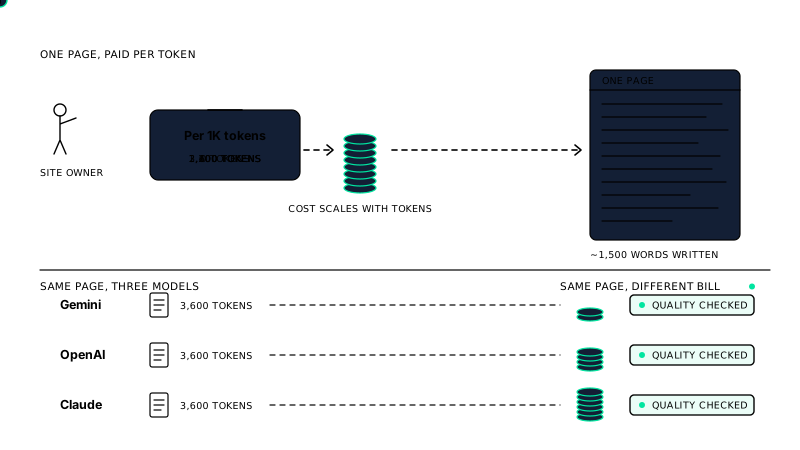
Every major AI provider prices by the token. A token is roughly four characters of English text, so 1,000 tokens is around 750 words. Providers typically quote input and output tokens separately, and output tokens almost always cost more.
Here is where the confusion starts. When you see a figure like $0.15 per million input tokens, it sounds negligible. But that number only covers the text you send in. A real content workflow sends a great deal of text in before a single word of output is generated.
Consider what a typical content prompt actually contains:
- A system instruction describing tone, structure and brand rules
- A content brief with target keyword, audience and word count
- Examples of existing content for style matching
- Product or service data, pricing, case studies
- SEO requirements such as meta title format and heading structure
That context block alone can run to 1,500 tokens or more before the model writes a single word. If you are also feeding in brand profiles that store your real case studies, pricing and tone of voice, the input token count climbs further. The output for a 1,000-word page adds roughly 1,300 to 1,400 tokens on top. Then factor in any quality-check passes that re-submit the draft for review, and your actual token consumption per page can be three to five times the naive estimate.
Providers also change their pricing and model tiers regularly. A model that was the budget option six months ago may have been repriced or replaced. Always check the current pricing page directly rather than relying on comparisons written more than a few weeks ago.
How to calculate the real cost of one content page
To get an honest per-page figure, you need to account for every token the workflow touches, not just the final output.
A practical formula looks like this:
- Measure your system prompt and brief. Paste your standard prompt into a token counter. Most providers offer one in their documentation. Note the token count.
- Add your context data. Include any product data, brand information or examples you inject per request.
- Estimate output length. A 1,000-word article is roughly 1,300 output tokens. A 1,500-word page is around 2,000.
- Multiply by the number of passes. If you run a draft pass and then a quality or revision pass, double the output tokens and add the input tokens for the second call.
- Apply the provider’s input and output rates separately. Calculate input cost and output cost, then add them.
As a worked example: suppose your system prompt and brief total 2,000 input tokens, you inject 500 tokens of brand data, and you want a 1,000-word output (1,300 tokens). With a single pass, you are looking at 2,500 input tokens and 1,300 output tokens per page. Run that through two passes for quality checking, as a well-structured workflow should, and you are closer to 5,000 input tokens and 2,600 output tokens per page. That is the number to price, not the raw output alone.
Running a 38-check quality gate after generation adds another call, but it also reduces the chance of publishing content that needs expensive human rework. Whether that extra token cost pays for itself depends on the model you are using and the standard your content needs to meet – which is exactly what the next sections work through.
Gemini pricing: what you actually pay per page
Google’s Gemini models are priced by the million tokens, and the rates vary significantly depending on which model tier you choose and how large your input context is. As of mid-2025, Gemini 1.5 Flash is the budget option, with input priced at around $0.075 per million tokens for prompts under 128,000 tokens, and output at around $0.30 per million tokens. Gemini 1.5 Pro sits considerably higher, at roughly $3.50 per million input tokens and $10.50 per million output tokens for the same context window.
Using the worked example from the previous section – 5,000 input tokens and 2,600 output tokens across two passes – the maths looks like this:
- Gemini 1.5 Flash: 5,000 input tokens costs roughly $0.000375, and 2,600 output tokens costs roughly $0.00078. Total: under $0.002 per page.
- Gemini 1.5 Pro: The same workflow costs approximately $0.0175 for input and $0.0273 for output. Total: around $0.045 per page.
Flash looks almost free until you account for quality. Flash is capable for short, simple content, but on longer pages requiring nuanced tone, structured arguments or accurate product detail, it can produce output that needs significant human editing. That editing time has a cost. Pro closes most of that gap, but at roughly 20 times the price per page.
Gemini also offers a free tier via Google AI Studio, which is useful for testing prompts and measuring your actual token consumption before you commit to production volumes.
OpenAI pricing: GPT-4o and GPT-4o mini compared
OpenAI’s most widely used models for content generation are GPT-4o and GPT-4o mini. GPT-4o is currently priced at $5.00 per million input tokens and $15.00 per million output tokens. GPT-4o mini drops that to $0.15 per million input tokens and $0.60 per million output tokens.
Running the same two-pass workflow through each model:
- GPT-4o mini: 5,000 input tokens at $0.15/M costs $0.00075, and 2,600 output tokens at $0.60/M costs $0.00156. Total: roughly $0.002 per page, comparable to Gemini Flash.
- GPT-4o: Input costs $0.025 and output costs $0.039. Total: around $0.064 per page.
GPT-4o mini punches above its price point for many content tasks. It handles clear briefs well and produces consistent structure. Where it struggles is with subtle brand voice, complex local SEO requirements or pages that need careful factual grounding – the kind of detail you would store in product and brand data fed into the prompt.
GPT-4o is noticeably stronger on tone and reasoning, which matters when your content needs to reflect a specific brand position or address a technically detailed subject. For agencies producing high volumes of location pages or product descriptions, the cost difference between mini and 4o adds up quickly. At 500 pages a month, GPT-4o costs roughly $32 versus $1 for mini – a gap that forces a deliberate decision about where quality genuinely matters.
OpenAI also offers batch processing at a 50 percent discount on both input and output, which is worth factoring in if your workflow allows for non-real-time generation. That alone can halve your AI content cost per page at scale.
Claude pricing: Haiku, Sonnet and Opus broken down
Anthropic prices Claude across three tiers, each aimed at a different point on the cost-quality curve. The current models most relevant to content generation are Claude 3 Haiku, Claude 3.5 Sonnet and Claude 3 Opus.
Haiku is the budget option, priced at $0.25 per million input tokens and $1.25 per million output tokens. Running the same two-pass workflow used in previous examples, that works out to roughly $0.0004 for input and $0.00325 for output. Total: under $0.004 per page. That is competitive with Gemini Flash and GPT-4o mini.
Claude 3.5 Sonnet sits at $3.00 per million input tokens and $15.00 per million output tokens. The same workflow produces an input cost of around $0.015 and an output cost of $0.039. Total: approximately $0.054 per page, putting it close to GPT-4o territory.
Claude 3 Opus is the most capable and the most expensive, at $15.00 per million input tokens and $75.00 per million output tokens. That brings the per-page cost to roughly $0.27, which is meaningfully higher than anything else in this comparison.
In practice, Sonnet is where most content teams land. It produces well-structured, naturally phrased output and handles nuanced briefs reliably. Haiku is fast and cheap but benefits from tighter prompting and a clear quality check before anything goes live. Opus is rarely justified for standard content pages given the price difference over Sonnet is large and the output gap is narrow for most use cases.
One genuine strength of the Claude family is instruction-following. When your prompt includes detailed brand voice guidelines, audience notes or factual constraints, Sonnet in particular tends to honour them consistently, which reduces the editing time that quietly inflates your real AI content cost per page.
Hidden costs that inflate your per-page bill
Token spend is only part of the picture. Several other factors push the true cost well above the API invoice figure, and ignoring them leads to budgets that do not hold.
System prompt overhead. Every call to an AI model carries a system prompt, sometimes several hundred tokens long. If your system prompt runs to 800 tokens and you are generating 500 pages a month, that is 400,000 tokens of input cost that never appears in a per-page estimate but always appears on your bill.
Retries and regenerations. Models fail occasionally. They produce off-topic output, hallucinate product details or ignore formatting instructions. Each retry costs the same as the original call. A five percent retry rate sounds small, but across volume it adds a measurable line to your costs. A structured quality gate that catches problems before output is accepted reduces wasted API spend, not just editorial time.
Human editing time. This is the cost most spreadsheets omit entirely. A cheaper model that requires 20 minutes of editing per page costs more in real terms than a premium model that needs five minutes. At a modest hourly rate, that gap dwarfs the token price difference between Haiku and Sonnet.
Prompt iteration during setup. Getting a prompt to perform consistently across different page types takes testing. Those test runs consume tokens. Budget for a prompt development phase, especially if you are building workflows for multiple content types or locations.
Context window misuse. Feeding large blocks of reference material into every call is common but expensive. Passing a full product catalogue into a prompt when only three SKUs are relevant inflates input tokens unnecessarily. Structured data fed selectively, as described in the structured data documentation, keeps context lean and costs predictable.
When you add these factors together, the real AI content cost per page is often two to four times the raw API figure. Building that multiplier into your planning from the start gives you a far more honest comparison between models and between AI content and traditionally commissioned writing.
Quality versus cost: when cheaper models cost more in the long run
The temptation to default to the cheapest available model is understandable. If Haiku or GPT-4o mini produces something that looks like a finished page, why pay more? The problem is that “looks like” and “performs like” are different things, and the gap between them shows up in your results rather than your invoice.
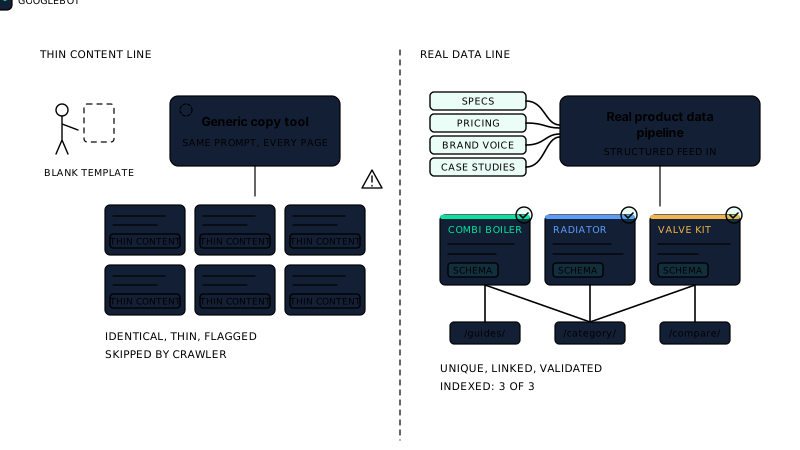
Thin or generic content tends to rank poorly. If a cheaper model produces pages that need significant rewrites to meet your quality bar, or pages that pass review but fail to convert or rank, the cost of that failure is real. You pay for the content twice: once to generate it and once to replace it.
There is also a consistency problem. Budget models handle straightforward briefs well but struggle when the task involves nuance, like a local landing page that needs to feel genuinely local rather than templated, or a product description that must reflect specific technical constraints. A page that reads as generic does not just underperform; it can actively damage trust with readers who notice.
The smarter framing is cost per outcome rather than cost per page. A page that ranks, converts and requires minimal editing has a lower real cost than a cheaper page that does none of those things. That reframe changes which model looks attractive.
It is also worth thinking about what happens at scale. A small quality gap per page compounds quickly. Fifty pages with marginal quality issues create a site-wide pattern that is harder to fix than it would have been to prevent. Pairing a capable model with a structured 38-check quality gate before content is published catches those issues systematically, rather than relying on manual review to hold the line.
How to choose the right model for your content budget
There is no single correct answer, but there is a practical process for finding your own.
Start by defining the content type and its stakes. High-traffic commercial pages, local landing pages and category descriptions carry more revenue risk than internal blog posts or supporting articles. Higher stakes justify higher model spend. Lower-stakes content is a reasonable place to use a faster, cheaper model, provided you have a quality check in place.
Next, run a real cost calculation for each model you are considering, using the method from the earlier section of this article. Include your average system prompt length, your expected retry rate and an honest estimate of editing time. That number, not the headline token price, is what you are comparing.
Then test on a representative sample. Generate ten to twenty pages with each candidate model using your actual prompts and brand guidelines. Score them against the same criteria you would apply to commissioned writing: accuracy, tone, structure, depth. The model that scores best on that test, adjusted for its real per-page cost, is the right choice for that content type.
A few practical rules of thumb hold across most scenarios:
- Use a premium model, Sonnet or GPT-4o, for pages where ranking and conversion matter directly.
- Use a mid-tier model for supporting content where volume matters more than marginal quality gains.
- Avoid the cheapest models for anything that carries your brand name prominently, unless you have tested them thoroughly against your specific prompts.
- Review your model choice periodically. Pricing and capability both change, and the best option today may not be the best option in six months.
If you are managing content across multiple page types or locations, it is worth reading how to build local landing pages without doorway-page risk alongside your model selection process. The content requirements for local pages affect both the prompt complexity and the model capability you need, which feeds directly into your AI content cost per page calculation.
The goal is not the cheapest possible content. It is the best content at a cost your business can sustain, with a clear line between what you spend and what you get back.
Frequently asked questions
What is the average AI content cost per page across the main models?
For a typical 1,000-word page, expect roughly $0.01 to $0.05 with Gemini Flash or Claude Haiku, $0.10 to $0.30 with GPT-4o mini or Claude Sonnet, and $0.50 to $1.50 or more with GPT-4o or Claude Opus, depending on prompt length, retry rate and output tokens. These are estimates, not guarantees, and your real figures will vary with your prompts.
Does using a cheaper model actually save money overall?
Not always. A cheaper model with a high retry rate, heavy editing time or frequent factual errors can cost more per usable page than a premium model that gets it right first time. Calculate cost per publishable page, not cost per generation, and factor in the human time spent fixing output before you decide.
Are token prices the same whether I use the API directly or through a plugin?
The underlying API prices are set by the model provider and do not change based on how you access them. What changes is how efficiently your tool constructs prompts. Bloated system prompts or redundant context passed on every request add tokens you are paying for without adding value to the output.
How often do AI model prices change?
Frequently. OpenAI, Google and Anthropic have each cut prices on major models more than once in the past two years. It is worth checking the official pricing pages for each provider every few months, especially before scaling up a content programme, because the cost comparison between models can shift significantly.
Should I use the same model for every content type on my site?
No. A sensible approach is to match model capability to content stakes. High-traffic product pages and service pages justify a premium model. Supporting blog posts and internal articles are reasonable candidates for a mid-tier model. Using one model for everything usually means overspending on low-stakes content or underspending on pages that matter most.
Getting AI content cost per page under control comes down to honest calculation, the right model for each job and a quality process that catches problems before they reach your site. The token price is just the starting point.
Writrex writes from your real business facts and checks every page before it publishes. Start with Writrex Lite for free.